4.5. Basic structure
Unicode (ISO 10646) and UTF-8 are used for all messages.
Parsing needs to be performed case sensitive.
All enum values (e.g. Alarm status) must use the exact casing stated in this specification.
Empty values are sent as “” for simple values and as [] for arrays. Optional values can be omitted, but can not be sent as null unless otherwise stated.
In the following example the message type is an alarm message.
{
    "mType": "rSMsg",
    "type": "Alarm",
    "mId": "E68A0010-C336-41ac-BD58-5C80A72C7092",
    "ntsOId": "",
    "xNId": "",
    "cId": "AB+84001=860SG001",
    "aCId": "A0001",
    "xACId": "Serious lamp error",
    "xNACId": "3143",
    "aSp": "Issue",
    "ack": "notAcknowledged",
    "aS": "Active",
    "sS": "notSuspended",
    "aTs": "2009-10-01T11:59:31.571Z",
    "cat": "D",
    "pri": "2",
    "rvs": [
        {
            "n": "color",
            "v": "red"
        }
    ]
}
JSon code 2: An RSMP message
The following table is describing the variable content of all message types.
Element |
Value |
Description |
|---|---|---|
mType |
rSMsg |
RSMP identifier |
type |
Alarm |
Alarm message |
AggregatedStatus |
Aggregated status message |
|
AggregatedStatusRequest |
Aggregated status request message |
|
StatusRequest |
Status message. Request status |
|
StatusResponse |
Status message. Status response |
|
StatusSubscribe |
Status message. Start subscription |
|
StatusUpdate |
Status message. Update of status |
|
StatusUnsubscribe |
Status message. End subscription |
|
CommandRequest |
Command message. Request command |
|
CommandResponse |
Command message. Response of command |
|
MessageAck |
Message acknowledgement. Successful |
|
MessageNotAck |
Message acknowledgement. Unsuccessful |
|
Version |
RSMP / SXL version message |
|
ComponentList |
Component list message |
|
Watchdog |
Watchdog message |
|
mId (or) oMId |
(GUID) |
Message identity |
Note
mId is a generated GUID (Globally unique identifier) in the equipment that sent the message
mId is used in all messages as a reference for the message ack
oMId is used in the message ack to refer to the message which is being acked
Only version 4 of Leach-Salz UUID is used for the GUID
Each message sent should have a new GUID, even if the message is resent or the content is the same
The following table describes attributes used by messages that refer to a component.
Element |
Description |
|---|---|
ntsOId |
deprecated (empty string) |
xNId |
deprecated (empty string) |
cId |
4.5.1. Alarm messages
Alarm message exchange is subject to Alarm exchange.
An alarm message is sent to the supervision system when:
An alarm becomes active / inactive
An alarm is requested
An alarm is acknowledged
An alarm is being suspended / un-suspended
An acknowledgment of an alarm does not cause a single alarm event to be acknowledged but all alarm events for the specific component with the associated alarm code id. This approach simplifies both in implementation but also in handling - if many alarms occur on the same equipment with short time intervals.
The ability to request alarms is used in case the supervision system loses track of the latest state of the alarms.
A suspend of an alarm causes all alarms from the specific component with the associated alarm code id to be suspended. This means that alarm messages stop being sent from the site as long as the suspension is active. As soon as the suspension is inactivated alarms can be sent again.
Suspending alarms does not affect alarm acknowledgment. This means that when unsuspending an alarm an alarm can be inactive and not acknowledged.
Alarm messages are event driven and sent to the supervision system when the alarm occurs. Acknowledgement of alarms and alarm suspend messages are interaction driven.
Alarm events are referring to ‘active’ (aSp:Issue), ‘suspended’ (aSp:Suspend) and ‘acknowledged’ (aSp:Acknowledged).
The timestamp (aTs) reflects the individual event according to the element ‘aSp’.
4.5.1.1. Message structure
4.5.1.1.1. Structure of an alarm message
An alarm message has the structure according to the example below.
{
    "mType": "rSMsg",
    "type": "Alarm",
    "mId": "E68A0010-C336-41ac-BD58-5C80A72C7092",
    "ntsOId": "",
    "xNId": "",
    "cId": "AB+84001=860SG001",
    "aCId": "A0001",
    "xACId": "Serious lamp error",
    "xNACId": "3143",
    "aSp": "Issue",
    "ack": "notAcknowledged",
    "aS": "Active",
    "sS": "notSuspended",
    "aTs": "2009-10-01T11:59:31.571Z",
    "cat": "D",
    "pri": "2",
    "rvs": [
        {
            "n": "color",
            "v": "red"
        }
    ]
}
JSon code 3: An alarm message
The following table describes the variable content of the message which is defined by the SXL.
Element |
Description |
|---|---|
aCId |
|
xACId |
|
xNACId |
The following table describes additional variable content of the message.
Element |
Value |
Origin |
Description |
|---|---|---|---|
aSp |
Issue |
Site |
An alarm becomes active/inactive. |
Request |
Supervision system |
Request the current state of an alarm |
|
Acknowledge |
Supervision system |
Acknowledge an alarm |
|
Site |
An alarm becomes acknowledged. |
||
Suspend |
Supervision system |
Suspend an alarm |
|
Site |
An alarm becomes suspended/unsuspended |
||
Resume |
Supervision system |
Unsuspend an alarm |
4.5.1.1.2. Alarm status
Alarm status are only used by alarm messages (not by alarm acknowledgement or alarm suspend messages).
Element |
Value |
Description |
|---|---|---|
ack |
Acknowledged |
The alarm is acknowledged |
notAcknowledged |
The alarm is not acknowledged |
|
aS |
inActive |
The alarm is inactive |
Active |
The alarm is active |
|
sS |
Suspended |
The alarm is suspended |
notSuspended |
The alarm is not suspended |
|
aTs |
(timestamp) |
Timestamp for when the alarm changes status. See the contents of aSp to determine which type of timestamp is used - aSp: Issue: When the alarm gets active or inactive
- aSp: Acknowledge: When the alarm gets acknowledged or not acknowledged
- aSp: Suspend: When the alarm gets suspended or not suspended
All timestamps are set at the local level (and not in the supervision system) when the alarm occurs (and not when the message is sent). See also the data type section. |
Fig. 4.1 show possible transitions between different alarm states.
Continuous lines define possible alarm status changes controlled by logic and dashed lines define possible changes controlled by user.
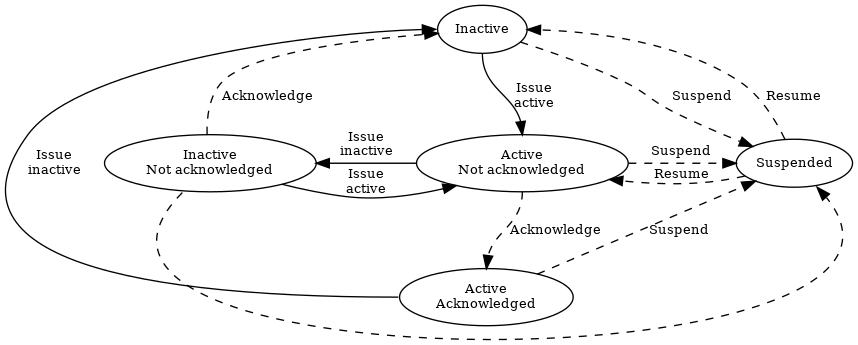
Fig. 4.1 Alarm transitions
Alarms should not be sent unless:
Alarms are unblocked and its state changes
Alarms are sent as part of Communication establishment between sites and supervision system
Alarms are explicitly requested using Structure for an alarm request message
The following table describes the variable content of the message which is defined by the SXL.
Element |
Description |
|---|---|
cat |
|
pri |
4.5.1.1.3. Return values
Return values (“rvs”) are used by alarm messages (but not by alarm acknowledgment or alarm suspend messages) and is always sent but can be empty (i.e. []) if no return values are defined.
Element |
Value |
Description |
|---|---|---|
rvs |
(array) |
Return values. Contains the element n and v in an array |
The following table describes the content for each return value which is defined by the signal exchange list (SXL).
Element |
Description |
|---|---|
n |
Name of the return value |
v |
Value from equipment |
4.5.1.1.4. Structure for an alarm request message
An alarm request message has the structure according to the example below.
{
     "mType": "rSMsg",
     "type": "Alarm",
     "mId": "3d2a0097-f91c-4249-956b-dac702545b8f",
     "ntsOId": "",
     "xNId": "",
     "cId": "AB+84001=860VA001",
     "aCId": "A0004",
     "xACId": "",
     "xNACId": "",
     "aSp": "Request"
}
JSon code 4: An alarm request message
4.5.1.1.5. Structure for an alarm acknowledgement message
An alarm acknowledgement message has the structure according to the example below.
{
     "mType": "rSMsg",
     "type": "Alarm",
     "mId": "3d2a0097-f91c-4249-956b-dac702545b8f",
     "ntsOId": "",
     "xNId": "",
     "cId": "AB+84001=860VA001",
     "aCId": "A0004",
     "xACId": "",
     "xNACId": "",
     "aSp": "Acknowledge"
}
JSon code 5: An alarm acknowledgement message which acknowledges an alarm
An alarm acknowledgement response message has the structure according to the example below.
{
     "mType": "rSMsg",
     "type": "Alarm",
     "mId": "f6843ac0-40a0-424e-8ddf-d109f4cfe487",
     "ntsOId": "",
     "xNId": "",
     "cId": "AB+84001=860VA001",
     "aCId": "A0004",
     "xACId": "",
     "xNACId": "",
     "aSp": "Acknowledge",
     "ack": "Acknowledged",
     "aS": "Active",
     "sS": "notSuspended",
     "aTs": "2015-05-29T08:55:04.691Z",
     "cat": "D",
     "pri": "3",
     "rvs": [
         {
             "n": "Temp",
             "v": "-18.5"
         }
     ]
}
JSon code 6: Response of an alarm acknowledgement message
4.5.1.1.6. Structure for an alarm suspend message
An alarm suspend message has the structure according to the example below.
{
     "mType": "rSMsg",
     "type": "Alarm",
     "mId": "b6579d6d-3a9d-4169-b777-f094946a863e",
     "ntsOId": "",
     "xNId": "",
     "cId": "AB+84001=860VA001",
     "aCId": "A0004",
     "xACId": "",
     "xNACId": "",
     "aSp": "Suspend"
}
JSon code 7: Suspending an alarm using an alarm suspend message
{
     "mType": "rSMsg",
     "type": "Alarm",
     "mId": "2ea7edfc-8e3a-4765-85e7-db844c4702a0",
     "ntsOId": "",
     "xNId": "",
     "cId": "AB+84001=860VA001",
     "aCId": "A0004",
     "xACId": "",
     "xNACId": "",
     "aSp": "Suspend",
     "ack": "Acknowledged",
     "aS": "Active",
     "sS": "Suspended",
     "aTs": "2015-05-29T08:56:25.390Z",
     "cat": "D",
     "pri": "3",
     "rvs": [
         {
             "n": "Temp",
             "v": "-18.5"
         }
     ]
}
JSon code 8: Response of alarm suspend message
{
     "mType": "rSMsg",
     "type": "Alarm",
     "mId": "2a744145-403a-423f-ba80-f38e283a778e",
     "ntsOId": "",
     "xNId": "",
     "cId": "AB+84001=860VA001",
     "aCId": "A0004",
     "xACId": "",
     "xNACId": "",
     "aSp": "Resume"
}
JSon code 9: Resuming an alarm using an alarm suspend message
{
     "mType": "rSMsg",
     "type": "Alarm",
     "mId": "3313526e-b744-434a-b4dd-0cfa956512e0",
     "ntsOId": "",
     "xNId": "",
     "cId": "AB+84001=860VA001",
     "aCId": "A0004",
     "xACId": "",
     "xNACId": "",
     "aSp": "Suspend",
     "ack": "Acknowledged",
     "aS": "Active",
     "sS": "notSuspended",
     "aTs": "2015-05-29T08:58:28.166Z",
     "cat": "D",
     "pri": "3",
     "rvs": [
         {
             "n": "Temp",
             "v": "-18.5"
         }
     ]
}
JSon code 10: Response of a resume message
Allowed content in alarm suspend message is the same as for alarm messages (See Structure of an alarm message) with the exception for alarm status (See Alarm status) and (See Return values).
4.5.1.2. Message exchange between site and supervision system
The following sequences apply when Alarm message exchange is permitted (see Alarm exchange).
Message acknowledgement (see section Message acknowledgement) is implicit in the following figures.
An alarm is active/inactive

An alarm message is sent to supervision system with the status of the alarm (the alarm is active/inactive)
An alarm is requested
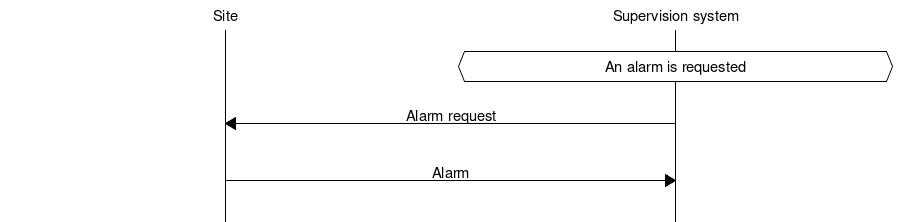
An alarm is requested from the supervision system
An alarm message is sent to supervision system with the status of the alarm
An alarm is acknowledged at the supervision system
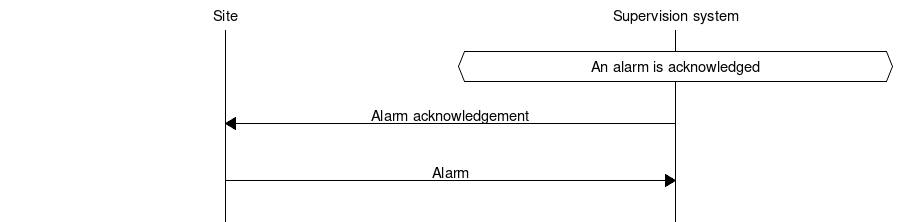
An alarm acknowledgement message is sent to the site
An alarm message is sent to the supervision system (that the alarm is acknowledged)
An alarm is acknowledged at the site

An alarm message is being sent to the supervision system with the status of the alarm (that the alarm is acknowledged)
An alarm is suspended/unsuspended from the supervision system
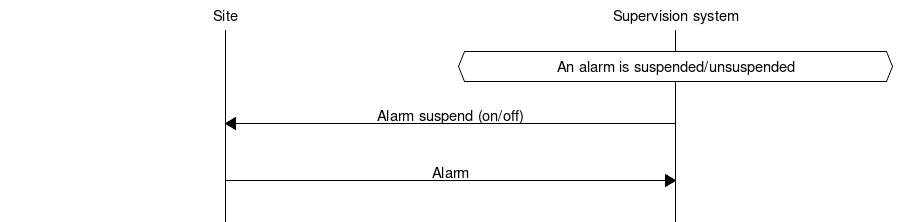
An alarm suspend message is being sent to the site
An alarm message is sent to the supervision system with the status of the alarm (that the suspension is activated/deactivated)
An alarm is suspended/unsuspended from the site

An alarm message is sent to the supervision system with the status of the alarm (that suspension is activated/deactivated)
4.5.2. Aggregated status message
An AggregatedStatus message provides a summarized status of the site. It is a core message and does not require an SXL to be used on the connection.
AggregatedStatus is sent during communication establishment, when the site’s state bits change, and in response to an AggregatedStatusRequest. The establishment sequences are defined in Communication establishment between sites and supervision system and Communication establishment between sites.
4.5.2.1. Message structure
An aggregated status message has the structure according to the example below.
{
     "mType": "rSMsg",
     "type": "AggregatedStatus",
     "mId": "be12ab9a-800c-4c19-8c50-adf832f22420",
     "ntsOId": "",
     "xNId": "",
     "aSTS": "2015-06-08T08:05:06.584Z",
     "se": [
             true,false,false,false,false,false,false,false
           ]
}
JSon code 11: An aggregated status message
The following tables are describing the variable content of the message:
Element |
Value |
Description |
|---|---|---|
aSTS |
(timestamp) |
Timestamp for the aggregated status. All timestamps are set at the site (and not in the supervision system) when the event occurs (and not when the message is sent). See also the data type section. |
The following table describes the site status.
Element |
Description |
|---|---|
se |
Array of eight booleans. See State bits. |
4.5.2.1.1. State bits
State bits se is an array of eight booleans. The first element is bit 1.
Each bit represents an error, warning or special state. A set bit indicates that the corresponding condition is present, while a cleared bit indicates that it is absent. When all bits are cleared, the aggregated status indicates normal operation of the site.
The condition for each bit is defined below.
An SXL may specify equipment-specific conditions for setting state bits, but these conditions must preserve the meanings and constraints defined by the core specification.
An AggregatedStatus bit must be set if any applicable condition defined by core or an SXL is true. The bit must be cleared if all applicable conditions are false.
All SXLs implemented by the site must be considered when determining bits, including SXLs not accepted during version negotiation.
For a given site state, identical AggregatedStatus bits must be sent across connections using the same core version.
Bit |
Status |
Description |
Color |
|---|---|---|---|
1 |
Local |
Local control |
|
2 |
Disconnected |
Connection lost (not used by sites) |
|
3 |
Error |
One or more alarm with priority 1 |
|
4 |
Warning |
One or more alarm with priority 2 |
|
5 |
Notice |
One or more alarm with priority 3 |
|
6 |
(Unused) |
Not used, must be cleared |
|
7 |
Idle |
Idle mode |
|
8 |
Not configured |
Connection not configured (not used by sites) |
|


- Bit 1: Local
Local overrides are in effect, so commands from supervisors may be restricted or overridden. Typically used during on-street maintenance when operating modes must be overridden for safety or testing purposes.
- Bit 2: Disconnected
Set by supervisor when reporting that connection to a site was lost. Not used by sites, which must always clear this bit.
- Bit 3: Error
One or more alarms with priority 1 (high) are active.
- Bit 4: Warning
One or more alarms with priority 2 (medium) are active.
- Bit 5: Notice
One or more alarms with priority 3 (low) are active.
- Bit 6: (Unused)
Not used, but reserved for future use. Must be cleared.
- Bit 7: Idle
The site is turned on but not in active use. This bit is unaffected by alarms and can be set at the same time as bits 3, 4 and 5.
- Bit 8: Not configured
Set by supervisors when reporting that connection to a site is not configured. Not used by sites, which must always clear this bit.
- Alarm priorities
For more details about alarm priorities, please see section Alarm priority.
4.5.3. Aggregated status request message
This type of message is sent from the supervision system to request the
latest aggregated status of the entire site, in case the supervision system has lost
track of the current status. The cId attribute must not be included.
4.5.3.1. Message structure
An aggregated status request message has the structure according to the example below.
{
     "mType": "rSMsg",
     "type": "AggregatedStatusRequest",
     "mId": "be12ab9a-800c-4c19-8c50-adf832f22425",
     "ntsOId": "",
     "xNId": ""
}
JSon code 12: An aggregated status request message
4.5.3.2. Message exchange between site and supervision system
Message acknowledgement (see section Message acknowledgement) is implicit in the following figures.
The site’s state bits change

An aggregated status message is sent to the supervision system.
The supervision system requests aggregated status

An aggregated status request message is sent to the site.
An aggregated status message is sent to the supervision system.
4.5.4. Status Messages
The status message is a type of message that is sent to the supervision system or other equipment with the value of one or more requested statuses, for the referenced component.
The status message can both be interaction driven or event driven and can be sent during the following prerequisites:
When status is requested from the supervision system or other equipment.
According to subscription – either by using a fixed time interval or when the status changes.
4.5.4.1. Message structure
4.5.4.1.1. Structure of a status request
A status request message has the structure according to the example below.
{
     "mType": "rSMsg",
     "type": "StatusRequest",
     "mId": "f1a13213-b90a-4abc-8953-2b8142923c55",
     "ntsOId": "",
     "xNId": "",
     "cId": "O+14439=481WA001",
     "sS": [
         {
             "sCI": "S0003",
             "n": "inputstatus"
         },{
             "sCI": "S0003",
             "n": "extendedinputstatus"
         }
     ]
}
JSon code 13: A status request message
The status code id (sCI) and name (n) are placed in an array
(sS) in order to enable support for requesting multiple statuses at
once.
The following table is describing the variable content of the message.
Element |
Description |
|---|---|
sCI |
|
n |
Name of the return value |
4.5.4.1.2. Structure for a status response message
A status response message has the structure according to the example below.
The status code id (sCI) and name (n) are placed in an array
(sS) in order to enable support for responding to multiple statuses at once.
The following table is describing the variable content of the message.
{
     "mType": "rSMsg",
     "type": "StatusResponse",
     "mId": "0a95e463-192a-4dd7-8b57-d2c2da636584",
     "ntsOId": "",
     "xNId": "",
     "cId": "O+14439=481WA001",
     "sTs": "2015-06-08T09:15:18.266Z",
     "sS": [
         {
             "sCI": "S0003",
             "n": "inputstatus",
             "s": "100101",
             "q": "recent"
         },{
             "sCI": "S0003",
             "n": "extendedinputstatus",
             "s": "100100101",
             "q": "recent"
         }
    ]
}
JSon code 14: A status response message
The following table is describing the variable content of the message:
Element |
Value |
Description |
|---|---|---|
sTs |
(timestamp) |
Timestamp |
All timestamps are set at the site (and not in the supervision system) when the status is fetched (and not when the message is sent). See also the data type section.
4.5.4.1.3. Return values (returnvalue)
Return values (“sS”) are always sent but can be empty if no return values exist.
Element |
Value |
Description |
|---|---|---|
sS |
(array) |
Return values. Contains the elements “sCI”, “s”, “n” and “q” in an array. |
Element |
Description |
|---|---|
sCI |
|
n |
Name of the return value |
s |
Value from equipment |
The following table describes additional variable content of the message.
Element |
Value |
Description |
|---|---|---|
q |
recent |
The value is up to date |
old |
The value is not up to date. Used when sending buffered values |
|
undefined |
The component does not exist |
|
unknown |
The value is unknown |
If the component does not exist or the value s is unknown then:
Subscription will not be performed
qis set according to the table abovesmust be set tonull
4.5.4.1.4. Structure for a status subscription request message
A message with the request of subscription to a status has the structure according to the example below. The message is used for constructing a list of subscriptions of statuses, digital and analogue values and events that are desirable to send to supervision system, e.g. temperature, wind speed, power consumption, manual control.
It’s allowed to change updateRate and sendOnChange by sending a new StatusSubscribe during an active subscription.
The site must not establish a new subscription but use the existing one.
{
     "mType": "rSMsg",
     "type": "StatusSubscribe",
     "mId": "d6d97f8b-e9db-4572-8084-70b55e312584",
     "ntsOId": "",
     "xNId": "",
     "cId": "O+14439=481WA001",
     "sS": [
         {
             "sCI": "S0001",
             "n": "signalgroupstatus",
             "uRt": "5",
             "sOc": false
         },{
             "sCI": "S0001",
             "n": "cyclecounter",
             "uRt": "5",
             "sOc": false
         },{
             "sCI": "S0001",
             "n": "basecyclecounter",
             "uRt": "5",
             "sOc": false
         },{
             "sCI": "S0001",
             "n": "stage",
             "uRt": "5",
             "sOc": false
         }
     ]
}
JSon code 15: A status subscribe message
The following table is describing the variable content of the message:
Element |
Type |
Description |
|---|---|---|
uRt |
number_as_string |
updateRate |
sOc |
boolean |
sendOnChange |
The updateRate uRt and sendOnChange sOc determines when a
status update should be sent.
The following applies:
updateRate defines a specific interval when to send updates. Defined in seconds with decimals, e.g. “2.5” for 2.5 seconds.
If updateRate is set to 0 it means that no update is sent using an interval.
sendOnChange defines if an status update should be sent as soon as the value changes. Note that an SXL can define when an attribute is updated, e.g. a timestamp might only update when another attribute changes.
It is possible to combine updateRate and sendOnChange to send an update when the value changes and at the same time using a specific interval.
If updateRate and sendOnChange=true are combined, the updateRate timer is reset when the value changes. For example, if updateRate is set to 5 seconds but the value changes after 2 seconds (triggering sendOnChange) the updateRate timer starts over and waits another 5 seconds to trigger.
It is not valid to set updateRate=0 and sendOnChange=false since it means that no subscription updates will be sent.
4.5.4.1.5. Attribute updates
When you set sendOnChange to true you will get an update whenever that attribute changes. However, the SXL can define when a particular attribute is updated. For example, a traffic light that report changes to signal groups might need to include a precise timestamp that indicates when in the cycle the change happened. But even though the cycle counter updates continuously, this should not in itself trigger an update. Instead the cycle counter should be sent along when the signal group state changes. In this case the SXL can define that the cycle counter is updated only when the signal group state changes.
4.5.4.1.6. Structure for a status update message
The status update message is an answer to a request for status subscription. It has the structure according to the example below.
In addition to being sent according to updateRate and sendOnChange, it is also always sent immediately after subscription request (even if the subscription is already active). The reason for sending the response immediately is because subscriptions usually are established shortly after RSMP connection establishment and the supervision system needs to update with the current statuses.
{
     "mType": "rSMsg",
     "type": "StatusUpdate",
     "mId": "dabb67f9-2601-4db9-bb8a-c7c47f57e100",
     "ntsOId": "",
     "xNId": "",
     "cId": "O+14439=481WA001",
     "sTs": "2015-06-08T09:33:04.735Z",
     "sS": [
         {
             "sCI": "S0001",
             "n": "signalgroupstatus",
             "s": "A021BC01",
             "q": "recent"
         },{
             "sCI": "S0001",
             "n": "cyclecounter",
             "s": "20",
             "q": "recent"
         },{
             "sCI": "S0001",
             "n": "basecyclecounter",
             "s": "10",
             "q": "recent"
         },{
             "sCI": "S0001",
             "n": "stage",
             "s": "1",
             "q": "recent"
         }
     ]
}
JSon code 16: A status update message
The allowed content is described in Table Status response and Return values.
Since different UpdateRate can be defined for different components it means that partial StatusUpdates can be sent.
{
     "mType": "rSMsg",
     "type": "StatusSubscribe",
     "mId": "6bbcb26e-78fe-4517-9e3d-8bb4f972c076",
     "ntsOId": "",
     "xNId": "",
     "cId": "O+14439=481WA001",
     "sS": [
         {
             "sCI": "S0096",
             "n": "hour",
             "uRt": "120",
             "sOc": false
         },{
             "sCI": "S0096",
             "n": "minute",
             "uRt": "60",
             "sOc": false
         }
     ]
}
JSon code 17: A subscription request to subscribe to statuses with different update rates
{
     "mType": "rSMsg",
     "type": "StatusUpdate",
     "mId": "b6bd7c96-f150-4756-9752-47a661e116db",
     "ntsOId": "",
     "xNId": "",
     "cId": "O+14439=481WA001",
     "sTs": "2015-05-29T13:47:56.740Z",
     "sS": [
         {
             "sCI": "S0096",
             "n": "minute",
             "s": "47",
             "q": "recent"
         }
     ]
}
JSon code 18: A partial status update. Only a single status is updated
4.5.4.1.7. Structure for a status unsubscription message
A message with the request of unsubscription to a status has the structure according to the example below. The request unsubscribes on one or several statuses. No particular answer is sent for this request, other than the usual message acknowledgement.
{
     "mType": "rSMsg",
     "type": "StatusUnsubscribe",
     "mId": "5ff528c5-f2f0-4bc4-a335-280c52b6e6d8",
     "ntsOId": "",
     "xNId": "",
     "cId": "O+14439=481WA001",
     "sS": [
         {
             "sCI": "S0001",
             "n": "signalgroupstatus"
         },{
             "sCI": "S0001",
             "n": "cyclecounter"
         },{
             "sCI": "S0001",
             "n": "basecyclecounter"
         },{
             "sCI": "S0001",
             "n": "stage"
         }
     ]
}
JSon code 19: A status unsubscribe message
The allowed content is described in Table Status Request
4.5.4.2. Message exchange between site and supervision system/other equipment - request
Message acknowledgement (see section Message acknowledgement) is implicit in the following figure.

Status request
Status response
4.5.4.3. Message exchange between site and supervision system/other equipment - subscription
Message acknowledgement (see section Message acknowledgement) is implicit in the following figure.
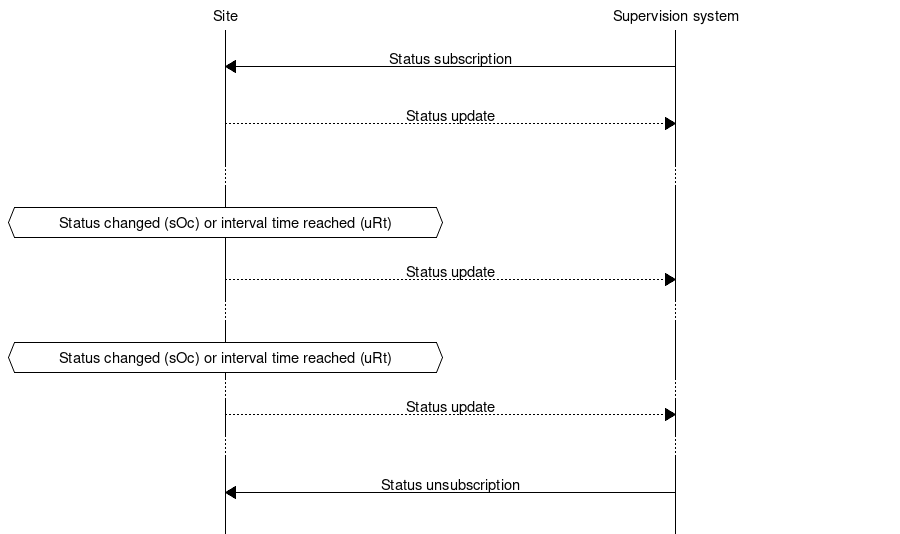
Example of message exchange with subscription, status updates and unsubscription.
4.5.5. Command messages
A command request is sent to a specific component on a site to execute a command.
If all required arguments are present and valid, the site immediately sends a MessageAck and starts executing the command. Once the execution completes, fails or times out the site sends a CommandResponse.
If a required argument is missing or any argument is invalid the site responds with a MessageNotAck and does not send a CommandResponse.
All arguments in a CommandRequest are required unless specifically marked as optional in the SXL. See the section about Incomplete commands.
Only a single command (cCI) is allowed in a CommandRequest or CommandResponse.
See the section about More than one command.
4.5.5.1. Message structure
4.5.5.1.1. Structure of a command request
A command request message has the structure according to the example below. A command request message with the intent to change a value of the requested component.
{
     "mType": "rSMsg",
     "type": "CommandRequest",
     "mId": "cf76365e-9c7b-44a4-86bd-d107cdfc3fcf",
     "ntsOId": "",
     "xNId": "",
     "cId": "O+14439=481WA001",
     "arg": [
         {
             "cCI": "M0001",
             "n": "status",
             "cO": "setValue",
             "v": "YellowFlash"
         },{
             "cCI": "M0001",
             "n": "securityCode",
             "cO": "setValue",
             "v": "123"
         },{
             "cCI": "M0001",
             "n": "timeout",
             "cO": "setValue",
             "v": "30"
         },{
             "cCI": "M0001",
             "n": "intersection",
             "cO": "setValue",
             "v": "1"
         }
     ]
}
JSon code 20: A command request message
The command code (cCI) and name of the argument (n) are placed in an
array (arg).
The following table is describing the variable content of the message:
Values to send with the command (arguments)
Element |
Type |
Description |
|---|---|---|
arg |
array |
Arguments. Contains the elements cCI, n, cO, v in an array |
The following table describes the variable content of the message which is defined by the SXL.
Element |
Type |
Description |
|---|---|---|
cCI |
string |
|
n |
string |
Name of the argument |
cO |
string |
Command. Optionally used for RPC (Remote Procedure Call) |
v |
(defined in SXL) |
(defined in SXL) |
4.5.5.1.2. Structure of a command response message
A command response message has the structure according to the example below. A command response message informs about the updated value of the requested component.
The command code (cCI) and name (n) are placed in an array
(rvs) in order to enable support for responding to multiple commands at
once.
{
     "mType": "rSMsg",
     "type": "CommandResponse",
     "mId": "0fd63726-be19-4c09-8553-48451735cb0b",
     "ntsOId": "",
     "xNId": "",
     "cId": "O+14439=481WA001",
     "cTS": "2015-06-08T11:49:03.293Z",
     "rvs": [
          {
             "cCI": "M0001",
             "n": "status",
             "v": "YellowFlash",
             "age": "recent"
          },{
             "cCI": "M0001",
             "n": "securityCode",
             "v": "123",
             "age": "recent"
          },{
             "cCI": "M0001",
             "n": "timeout",
             "v": "30",
             "age": "recent"
          },{
             "cCI": "M0001",
             "n": "intersection",
             "v": "1",
             "age": "recent"
          }
     ]
}
JSon code 21: A command response message
The following table is describing the variable content of the message:
Element |
Type |
Description |
|---|---|---|
cTS |
(timestamp) |
Timestamp for the command response. All timestamps are set at the site (and not in the supervision system) when the event occurs (and not when the message is sent). See also the data type section. |
4.5.5.1.3. Return values (returnvalue)
Return values (rvs) is always sent but can be empty if no return values are defined.
Element |
Type |
Description |
|---|---|---|
rvs |
(array) |
Return values. Contains the elements cCI, v, n and q in an array. |
The following table describes the variable content defined by the signal exchange list (SXL).
Element |
Type |
Description |
|---|---|---|
cCI |
string |
|
n |
string |
Name of the return value |
v |
(defined in SXL) |
(defined in SXL) |
The following table describes additional variable content of the message.
Element |
Value |
Description |
|---|---|---|
age |
recent |
The value is up to date |
old |
The value is not up to date |
|
undefined |
The component does not exist. v should be set to null. |
|
unknown |
The value is unknown. v should be set to null. |
4.5.5.2. Message exchange between site and supervision system/other equipment
Message acknowledgement (see section Message acknowledgement) is implicit in the following figure.
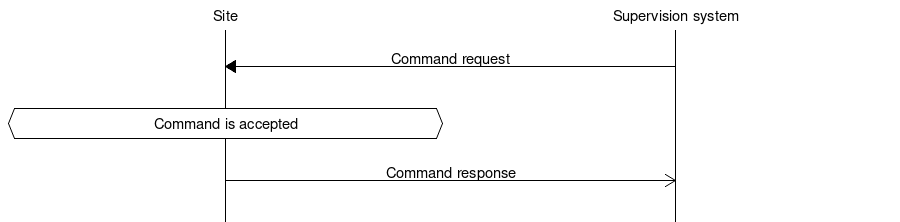
Command request
Command response
4.5.6. Message acknowledgement
Message acknowledgement is sent as an initial answer to all other messages. This type of message should not be mixed up with alarm acknowledgement, which has a different function. The purpose of message acknowledgement is to detect communication disruptions, function as an acknowledgment that the message has reached its destination and to verify that the message was understood.
There are two types of message acknowledgement – Message acknowledgment (MessageAck) which confirms that the message was understood and Message not acknowledged (MessageNotAck) which indicates that the message was not understood.
If no message acknowledgement is received within a predefined time, then each communicating party should treat it as a communication disruption. (See Communication disruption)
The default timeout value should be 30 seconds.
If the version messages have not been exchanged according to communication establishment sequence (See Communication establishment between sites and supervision system and Communication establishment between sites) then message acknowledgement (MessageAck/MessageNotAck) should not be sent as a response to any other messages other than the version message (See RSMP/SXL Version). The lack of acknowledgement forces the other communicating party to treat it as communication disruption and disconnect and reconnect, ensuring that the connection restarts with communication establishment sequence.
The acknowledgement messages are interaction driven and are sent when any other type of message is received.
4.5.6.1. Message structure – Message acknowledgement
An acknowledgement message has the structure according to the example below.
{
     "mType": "rSMsg",
     "type": "MessageAck",
     "oMId": "49c6c824-d593-4c16-b335-f04feda16986"
}
JSon code 22: An acknowledgement message
4.5.6.2. Message structure – Message not acknowledged
A “not acknowledgement” message has the structure according to the example below.
{
     "mType": "rSMsg",
     "type": "MessageNotAck",
     "oMId": "554dff0-9cc5-4232-97a9-018d5796e86a",
     "rea": "Unknown packet type: Watchdddog"
}
JSon code 23: A not acknowledgement message
The following table is describing the variable content of the message:
Element |
Type |
Description |
|---|---|---|
rea |
string |
(optional) Error message where all relevant information about the nature of the error can be provided. |
4.5.6.3. Message exchange between site and supervision system/other equipment
Supervision system sends initial message

A message is sent from supervision system or other equipment
The site responds with an message acknowledgement
Site sends initial message

A message is sent from the site
The supervision system or other equipment responds with an message acknowledgement
4.5.7. RSMP/SXL Version
Version messages are used to negotiate RSMP core and SXL versions, as well as to send information such as site identity and communication options.
The negotiation procedure is defined in Version negotiation.
4.5.7.1. Version Request
The initial Version request sent by the site must include all attributes required by any listed core version.
The initial Version request sent by the site contains:
Site Id.
Supported RSMP core versions
Supported SXLs and their versions
{
     "mType": "rSMsg",
     "type": "Version",
     "step": "Request",
     "mId": "6f968141-4de5-42ff-8032-45f8093762c5",
     "RSMP": [
         { "vers": "3.2.1" },
         { "vers": "3.3.0" }
     ],
     "siteId": [
         { "sId": "O+14439=481WA001" }
     ],
     "SXL": "1.3.0",
     "SXLS": [
         { "name": "traffic_light_controller", "version": "1.3.0", "prefix": "tlc/" },
         { "name": "traffic_light_controller/advanced", "version": "1.3.4", "prefix": "tlc/" },
         { "name": "variable_message_sign", "version": "1.0.6", "prefix": "vms/" }
     ]
}
JSon code 24: A Version Request message
The following table describes variable content of the message:
Element |
Type |
Description |
|---|---|---|
step |
string |
Must be set to ‘Request’. |
siteId |
array |
Array of site ids. Must contain exactly one object with |
RSMP |
array |
Nonempty array of objects, each with a |
SXL |
string |
Optional. Version of the primary SXL, for backward compatibility. |
SXLS |
array |
Array of supported SXLs. |
Only one site can use the same connection. The siteId array must therefore contain
exactly one element.
The SXL attribute specifies the version of the primary SXL used with supervisors that
only support older core versions and ignore the newer SXLS array.
When present and nonempty, SXL must match the version of that SXL in SXLS.
The SXLS array may be empty if the site does not support any SXLs. In this case SXL must be
set to an empty string.
Duplicate SXL names are not allowed in the request.
Each item in the SXLS array must be an object with the following content:
Element |
Type |
Description |
|---|---|---|
name |
string |
SXL name, e.g. |
version |
string |
Version of the SXL, e.g. “1.3.0”. |
prefix |
string |
(Optional) Prefix defined in the SXL. Omitted if the SXL does not define a prefix. |
If the site supports multiple versions of an SXL, the latest must be specified. Version ordering is defined in Version negotiation.
4.5.7.2. Version Response
If the core version can be matched, the supervisor returns a Version response containing:
Supervisor ID.
RSMP core version to use.
The status for each SXL offered by the site.
List of SXLs that the supervisor expected the site to offer, but which the site did not offer.
Optional
useAlarmsflag, indicating whether Alarm messages may be exchanged.
{
      "mType": "rSMsg",
      "type": "Version",
      "step": "Response",
      "mId": "d2c4815f-8318-4f3d-938a-cb28529fd86f",
      "RSMP": [
         { "vers": "3.3.0" }
      ],
      "supervisorId": "O+14439=481WA001",
      "SXLS": [
         { "name": "traffic_light_controller", "status": "ok", "version": "1.3.0" },
         { "name": "traffic_light_controller/advanced", "status": "unsupported" },
         { "name": "variable_message_sign", "status": "mismatch", "supported": ["2.0.0", "2.0.1", "2.1.0"] },
         { "name": "traffic_data", "status": "expected" }
      ],
      "useAlarms": false
}
JSon code 25: A Version Response message
In this example, only the SXL traffic_light_controller will be used.
The SXL traffic_light_controller/advanced is not used, because the supervisor
does not support that SXL.
The SXL variable_message_sign is not used, because the supervisor does not support the version 1.0.6 specified by the site.
The supervisor lists the versions it supports, in this case 2.0.0, 2.0.1 and 2.1.0.
The SXL traffic_data is not used, because the site did not offer it in the Version request. The supervisor informs that it
expected the site to offer this SXL.
The following table describes variable content of the message:
Element |
Type |
Description |
|---|---|---|
step |
string |
Must be set to ‘Response’. |
supervisorId |
string |
The id of the supervisor, provided for information (see Version negotiation). |
RSMP |
array |
Core version used. Array with exactly one object with the attribute |
SXLS |
array |
List of SXLs and status for each. |
useAlarms |
boolean |
Optional. Defaults to true. If set to false, no Alarm messages may be exchanged on the connection. |
See Alarm exchange for the handling of Alarm messages when useAlarms is false.
The SXLS array must contain each SXL from the Version request, even if the supervisor does not support them.
In addition, the SXLS array should contain all SXLs that the supervisor expected the site to offer,
but which the site did not offer in the Version request.
Duplicate SXL names are not allowed.
Each item in the SXLS array must be an object with the following content:
Element |
Type |
Description |
|---|---|---|
name |
string |
SXL name, e.g. |
status |
string |
The status code for this SXL (see table below). |
version |
string |
(Conditional) If status is “ok” it must match the version in the Version request, otherwise it’s omitted. |
supported |
array |
(Conditional) If status is “mismatch” it must be an array of supported versions, otherwise it’s omitted. |
Code |
Description |
|---|---|
ok |
OK |
unsupported |
SXL not supported by the supervisor. |
mismatch |
SXL version not supported by the supervisor. |
expected |
SXL expected by the supervisor, but not offered by the site. |
Details:
ok The SXL will be used, at the exact version specified by the site in the Version request.
versionmust be set to the exact same version sent by the site in the Version request.unsupported The SXL is unknown or not supported by the supervisor.
versionmust be omitted.mismatch The version specified by the site in the Version request is not supported by the supervisor.
supportedmust be set to an array of supported version strings, in ascending order, with the latest version last. Version ordering is defined in Version negotiation.expected means that the supervisor was expecting the site to offer this SXL but it did not. This status is informational only and does not indicate an error.
A supervisor must not use status codes other than those listed above.
An SXL will be used only if the status is ok. All status codes other than ok mean the SXL will not be used.
See Version negotiation for how SXL status codes affect communication.
4.5.8. ComponentList
A ComponentList message is used to list the components on a site. It is sent during communication establishment, and whenever the component list changes, i.e. if a component is added, removed or changed.
The ComponentList message is the authoritative source of information about the components on the site. It contains all components, including components whose type is defined by an SXL which the supervisor rejected during Version negotiation. Listing a component does not implicitly accept that SXL or permit its alarm, status or command messages to be used.
The ComponentList takes precedence over any static configuration that the supervisor might have. However, it is up to the supervisor implementation to decide how to handle discrepancies, e.g. by automatically updating its configuration or raising an alarm in the supervisor system. If the supervisor doesn’t have any configuration for the site, it can use the ComponentList to discover the components.
The list of components is sent as an array, and must be ordered by component IDs, using Natural Sorting. IDs must be unique on the site.
4.5.8.1. Message structure
A ComponentList message has the structure according to the example below.
{
     "mType": "rSMsg",
     "type": "ComponentList",
     "mId": "a1b2c3d4-e5f6-47g8-h9i0-j1k2l3m4n5o6",
     "components": [
         {
             "id": "detectors/radar/1",
             "type": "tlc/dl",
             "name": "Bus Detection A1 Northbound"
         },
         {
             "id": "groups/2",
             "type": "tlc/sg",
             "name": "Signal Group A1 North"
         },
         {
             "id": "groups/10",
             "type": "tlc/sg",
             "name": "Signal Group B2 South"
         }
     ]
}
JSon code 26: A ComponentList message
The following table describes the variable content of the message:
Element |
Type |
Description |
|---|---|---|
components |
array |
List of components on the site, ordered by their IDs, using Natural Sorting |
The following table describes the content of each component in the array:
Element |
Type |
Description |
|---|---|---|
id |
string |
Component ID identifying the component |
type |
string |
Component type, as defined by an SXL version advertised by the site. The SXL does not need to be accepted by the supervisor. See Component Type for information about component types. |
name |
string |
Human readable name of the component |
4.5.9. Watchdog
The primary purpose of watchdog messages is to ensure that the communication remains established and to detect any communication disruptions between site and supervision system. For any subsystem alarms are used instead.
The secondary purpose of watchdog messages is to provide a timestamp that can be used to check time synchronization. However watchdog messages should not be used to adjust the clock. Instead more robust synchronization methods, e.g. NTP or GPS, should be used to synchronize clocks.
The interval duration for sending watchdog messages should be configurable at both the site and the supervision system. The default setting should be (1) once a minute.
Watchdog messages are sent in both directions, both from the site and from the supervision system. At initial communication establishment (after version message) the watchdog message should be sent.
4.5.9.1. Message structure
A watchdog message has the structure according to the example below.
{
     "mType": "rSMsg",
     "type": "Watchdog",
     "mId": "f48900bc-e6fb-431a-8ca4-05070016f64a",
     "wTs": "2015-06-08T12:01:39.654Z"
}
JSon code 27: A watchdog message
The following table is describing the variable content of the message:
Element |
Type |
Description |
|---|---|---|
wTs |
(timestamp) |
Timestamp for the watchdog. See also the data type section. |
4.5.9.2. Message exchange between site and supervision system/other equipment
Message acknowledgement (see section Message acknowledgement) is implicit in the following figures.
Site sends watchdog message

Watchdog message is sent from site
Supervision system/other equipment sends watchdog message

Watchdog message is sent from supervision system/other equipment